Nothing leaves the tab. Here’s the mechanism.
Every FernPDF tool that says “your files stay private” means it architecturally, not as a policy promise. This page explains how, so you don’t have to take our word for it.
No upload endpoint exists
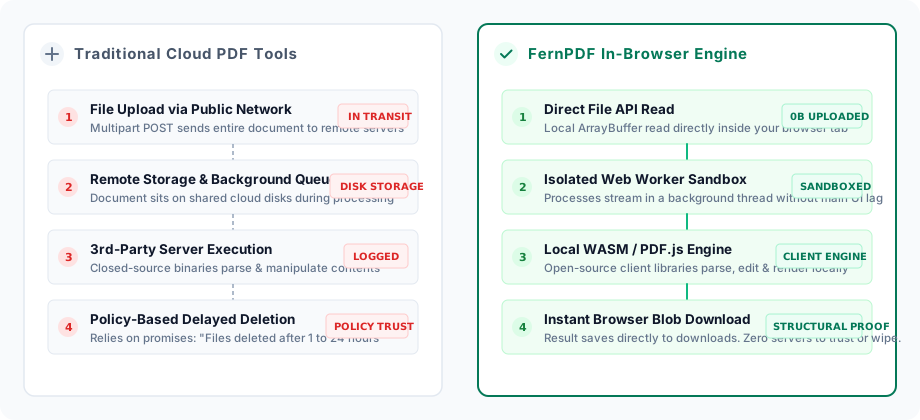
There is no server route in FernPDF that accepts a document. Every tool reads your file with the browser's File API and processes it with client-side libraries (PDF.js, pdf-lib), so there's nothing to send even if the code tried.
Verify it yourself
Open your browser's DevTools, switch to the Network tab, and run any tool with a real file. Filter by Fetch/XHR: you'll see the page assets load once, then silence while your document is processed. No POST body, no multipart upload, nothing.
Locked-down by default
The site ships a restrictive Content-Security-Policy, HSTS, X-Frame-Options: DENY, and a Permissions-Policy that disables camera, microphone, geolocation, and USB access at the browser level, whether or not any tool would ask.
No accounts, no cookies, no trackers
FernPDF sets no tracking cookies and ships no third-party analytics or ad scripts. The only data stored is in your browser's localStorage (your theme and optional local job history), and it never leaves your device.
How processing actually works
When you drop a file into a tool, it’s opened directly by JavaScript in your browser tab. Reading, rendering, and rebuilding PDFs is done locally by the open-source libraries PDF.js (Mozilla) and pdf-lib, in some cases inside a Web Worker for speed. The result is assembled in your browser’s memory and saved through your browser’s normal download mechanism, never through a network request to us.
Being precise about what this does and doesn’t cover: processing locally removes the risks that come with holding your documents on a server, but it can’t protect against a compromise of your own device, browser, or a malicious browser extension. No architecture eliminates every risk, and we’d rather say so than imply otherwise.
Transport & header security
HTTP requests redirect to HTTPS in a single hop, and Strict-Transport-Security tells browsers to always use HTTPS for this domain going forward. The Permissions-Policy header disables camera, microphone, geolocation, and USB access at the browser level: no tool on this site asks for them, and the browser will refuse a request for them even if it tried.
Found a real vulnerability?
Email it directly through the contact page. For the full legal detail on data handling and your rights, see the privacy policy.