01Who we are and what this covers
FernPDF (“FernPDF”, “we”, “us”) provides browser-based document, image, developer and calculator tools at fernpdf.joshuaalanfernandes.com. This policy explains what happens to your documents and what little information we handle when you use the site.
FernPDF is an independent project run by one person, not a company. That individual is the data controller for the little personal data this site involves. There is no published contact address at present.
The honest summary: FernPDF does not upload the documents you process. The site is delivered as static files, document processing runs inside your browser, and there is no FernPDF server that receives, stores, or analyses your files. There are three layers worth separating in your head: FernPDF, which never receives document content; the hosting provider, which sees ordinary web-request data like your IP address; and your browser, which does the processing and holds anything saved locally.
02How your files are processed
When you drop a file into any FernPDF tool, it is opened directly by JavaScript running in your browser tab. Reading, rendering, and rebuilding PDFs is done locally by the open-source libraries PDF.js (Mozilla) and pdf-lib, running on your own device, in some cases inside a Web Worker for speed. The processed result is assembled in your browser’s memory and saved through your browser’s normal download mechanism.
FernPDF does not upload the documents you process to any FernPDF server: there is no upload endpoint, no document storage, and no processing server. You can verify this yourself, open your browser’s developer tools, watch the Network tab, and run any tool.
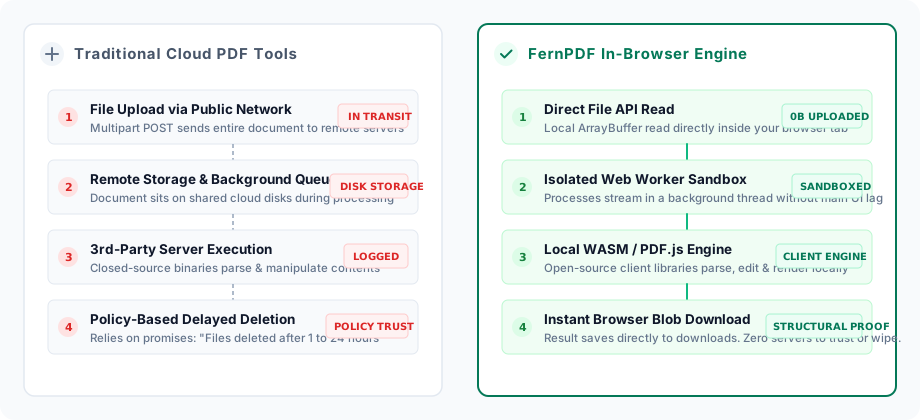
Being precise about what that does and does not cover: processing locally removes the risks that come with holding documents on a server, but it cannot protect against a compromise of your own device, your browser, a browser extension, or the code delivered to your browser. No architecture eliminates every risk, and we would rather say so than imply otherwise.
Because processing happens on your device, your files also never touch a queue, a temporary bucket, or a “deleted after 24 hours” server. There is simply nothing on our side to delete.
03What we collect, and what we don't
FernPDF is designed to minimise the personal data it collects. Specifically:
- No accounts. Every tool works without signing up, so we hold no names, email addresses, or passwords.
- No file contents. As described above, documents never leave your device.
- No analytics or advertising trackers. The site ships no third-party analytics scripts, ad pixels, or fingerprinting code.
- No usage profiles. We do not log which tools you use or how often. Your browser can keep an optional history for your own dashboard (described below), but it stays on your device.
What the site remembers, it remembers only on your device, in your browser’s localStorage: your theme choice (light or dark), your settings toggles, and (if you leave history enabled) a local activity log of the jobs you run (the tool used, the file name, file sizes, and a timestamp; never file contents). None of this is transmitted anywhere, and you can switch history off or erase everything at any time (see “Your local workspace” below).
If you email us, we receive whatever you choose to include in that email and use it only to reply to you.
04Your local workspace
The dashboard and account pages show statistics and a “recent jobs” list. All of it is computed from the local activity log in your own browser. There is no server-side copy, and opening FernPDF on another device or browser starts from a blank slate, because nothing follows you.
You are in full control of this log: the account page has a switch to stop recording history entirely, and a “clear local history” action that erases the job list and statistics in one click. Clearing your browser’s site data for fernpdf.joshuaalanfernandes.com removes it too. The log keeps at most the last 100 jobs and stores only metadata (tool, file name, sizes, time), never the documents themselves.
05The document assistant
Today the document assistant works entirely on your device: it searches inside the PDF you load, reports document stats (pages, words, reading time), and exports the text, all computed in your browser’s memory over the document’s own text layer. Your queries and your document’s text are never sent to us or to any third party, because there is no network call involved. The indexed text is discarded when you close the tab, and the assistant can be switched off entirely on the account page.
AI summaries and chat are not available yet.They are marked “coming soon” in the product and are still in development. If and when we ship an AI feature that needs to process your document outside your browser, we will update this policy first and clearly label, inside the product, exactly what data would be transmitted, to whom, and under what terms, before any document content leaves your device.
06Camera, microphone and location
The Service never asks for your camera, microphone, or location. No tool on the site requests those permissions, so your browser will never prompt you for them here. If a page claiming to be FernPDF ever does, it is not us, close it.
The site also uses browser security policies, including a Permissions-Policy header, to switch off access to sensitive browser capabilities it does not need, so a request for them would be refused by the browser rather than merely absent from our code.
08Hosting and server logs
FernPDF is a static website hosted by Vercel Inc. (United States), which serves the pages, scripts, and fonts from a global content network. Like virtually all web hosts, Vercel may process standard access logs, your IP address, browser user-agent, and the URL requested, for delivery, security, abuse prevention, and operations. Vercel acts as our processor for that data, and its retention periods are set by its own security and operational policies, which are described in its privacy documentation.
These logs relate only to fetching the site itself. Your documents are never part of any request, so they can never appear in any log. We do not use access logs to identify or profile visitors.
10Data retention
There is nothing for us to retain. Files you process exist only in your browser tab’s memory and are released when you close the tab or navigate away. The results you download are saved only to your device. On our side, no copy is ever created, so no retention or deletion schedule is needed.
The one thing that persists is the device-local data described above (your preferences and optional activity log), which stays in your browser until you delete it. We could not delete it for you even if we wanted to: we have no access to it.
11Security
The strongest protection for your documents is architectural: data that is never transmitted cannot be intercepted in transit or breached from a server. Beyond that, the site is served over HTTPS, and all processing runs inside your browser’s sandbox using well-maintained open-source libraries.
We recommend keeping your browser up to date, since your browser is where the work happens.
12Your rights (GDPR, CCPA, and others)
Privacy laws such as the EU/UK GDPR and the California Consumer Privacy Act give you rights over personal data an organization holds about you: access, correction, deletion, portability, objection, and the right not to have your data sold.
FernPDF is built so there is almost nothing to exercise them against. We hold no account, no profile, and none of your documents. The only personal data connected to your visit is the IP address and request metadata our host records in server logs, described under Hosting and server logs, we do not link it to you, combine it with anything else, or use it to build a profile. Everything else (your theme, preferences, saved notes, and optional activity log) lives in your own browser, where you can view it, switch it off, or delete it from the account page or your browser settings.
There is no published contact address at present, so a request cannot currently be made to us directly. If you are in the EU or UK you retain the right to lodge a complaint with your local data protection authority, and the same is true of the equivalent authority elsewhere.
13Legal bases, and rights in your region
Because your documents are processed on your device, the only personal data we come into contact with is what our host records to serve and protect the site, principally IP addresses and request metadata in server logs. Where the UK or EU GDPR applies, our lawful basis for that narrow processing is our legitimate interest (Article 6(1)(f)) in delivering the site securely and reliably. We do not rely on consent for it, because it is not optional to serving a web page, and we do not use it for profiling or advertising.
If you are in the EEA, UK, or Switzerland, you have the right to access, correct, erase, restrict, or object to processing of your personal data, the right to data portability, and the right to complain to your local supervisory authority. Given how little we hold and that it is not linked to your identity, we are often unable to connect log entries to a specific person, a limitation that also means there is little about you to disclose or misuse.
If you are in California,we do not sell or share personal information as those terms are defined by the CCPA/CPRA, we do not process it for cross-context behavioural advertising, and we have not done so in the preceding twelve months. There is accordingly no “Do Not Sell or Share My Personal Information” mechanism to offer. You retain your rights to know, delete, correct, and to be free from discrimination for exercising them.
If you are in Brazil, the LGPD applies to this site, and the same analysis holds: the only personal data we process is technical request data, on the basis of our legitimate interest in delivering and securing the service. You have rights of confirmation, access, correction, anonymisation, portability, deletion, and information about sharing, exercisable at the address below. We are a small processing agent and maintain this email address as the channel for those requests.
International transfers. The site is served by Vercel Inc. from a global content network, so your request may be handled by a server outside your country, including in the United States. Vercel publishes the transfer mechanisms it relies on for that infrastructure; because we operate no server of our own and store nothing beyond what its logs contain, those are the only transfers involved.
There is no published contact address at present. Your right to complain to your local supervisory authority is unaffected.
14Children's privacy
FernPDF is not directed to children, does not knowingly seek personal information from them, and does not ask any visitor to create an account or submit a document. There is no mechanism by which a child’s documents or profile could be gathered through normal use of the site.
The hosting infrastructure will nevertheless process standard technical information such as an IP address whenever any device requests the site, a child’s included, in the same way it does for every visitor. We have no way to identify a visitor’s age from that data and do not attempt to.
15Changes to this policy
If we change how the site works in a way that affects your privacy (for example, adding accounts, real AI processing, or analytics), we will update this policy and the “Last updated” date at the top before the change takes effect. Material changes will be announced prominently on this page. The current version always lives at fernpdf.joshuaalanfernandes.com/privacy.
16Contact us
This policy has no published contact address. For the rules governing your use of the site, see our Terms & Conditions.